Showing posts with label Mobile Issues. Show all posts

14 May, 2013

WeChat ~ The Whatsapp alternative?

Among the bunch of networking applications available in the apps town, WeChat is hitting the markets strongly with their increased Television advertising. As the Headline suggests, we are comparing this app with one of the most popular Networking app, Whatsapp!

Yes! for our readers we bring out the reviews of WeChat, the app, for Smartphones!
WeChat is available for the following platforms, Android, Windows, Nokia Symbian, PC, and recently it has also extended its support to Blackberry devices.
It has almost all features which are required by Smartphones' Networking applications, with the cutting edge of Audio & Video Calling feature.
Based on the reviews of Tech2.com, this app has quite good interface & features, but it might be difficult for you to convince your friends and family to download and install this app.

Overall, Its quite good app, offering stunning, eye-catching features, but we have to wait for its stable release.

Official Webpage ~ www.wechat.com

Ginger anodyne clears the palate

24 March, 2013

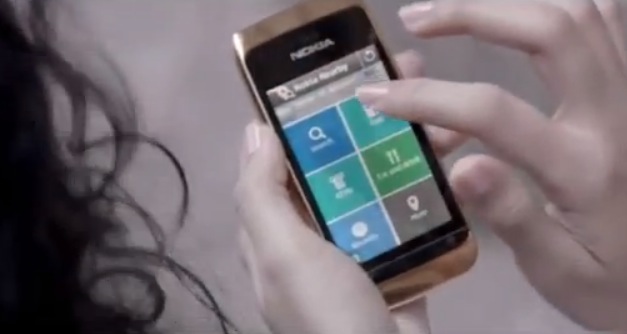
Nokia Nearby Review

You are at some unfamiliar place with your love, and looking for some Coffee. Or you are out of your hometown, and you require some medicines etc. Or you might be searching for some shop, restaurant, to which you need directions.
Be it the Coffee shop, a chemist's place, or some restaurant, doctor,  etc., you can now find it on your Nokia Cellphone. Nokia has introduced a classic location-tracking web app which detects your location & then suggest you the nearby businesses, doctors etc, which is very helpful in day to day situations.
Nokia Nearby app is available for almost all mobile phones running on Symbian 60 & Series 40 platform. It was first introduced in Nokia Asha series, but now supports almost all devices.
You just need a GPRS activated cellphone to use this App.

You can download the app from here ~ http://store.ovi.com/content/309930

26 January, 2013

UC Browser ~ A Web Browser for every phone!

Be it your Android Phone, Nokia Symbian or even your Nokia Symbian 40 series handset, the UC Web Browser is for your every* mobile phone! On surfing on the official Webpage of the UC Web Browser, we found that the this application has been developed in China & India itself. As per now, many mobile internet users are aware of this application, while some are still on their mobile's default web browser, which is, most of the time, quite slow and is not equipped with good features such as Pause & Resume Downloads etc.

We personally reviewed the response and efficiency of this application on Nokia Symbian, ans Series 40 devices, and found the following points to ponder upon ~


  • Better Speed. (Very useful for 2G Internet Services)
  • Quick operation.
  • Easy Installation on almost all devices.
  • Its light, doesn't uses much space.
  • Facility to pause and resume downloads, even after restarting your cell phone.
  • Easy Navigation & Not-so-complex Interface.
  • Free of Cost
  • Didn't crashed during our review.
With more than 400 million Global Users, the UC web browser has hit the 3 major internet markets of the world, i.e., US, China & India. As per the thenextweb.com 's interview with the CEO of UC Web Browser, UCWeb makes money from UCBrowser in two ways: advertisements, and taking a cut of monies that flow through the games on its platform, where advertisements have the greater share in the revenue.

Browse through the following links to get into the UC Web spectrum!

Official Webpage ~ www.ucweb.com

For Easy Installation ~ wap.ucweb.com

17 January, 2013

Windows Phone 7.8 update Coming up in early 2013


About 96% of people nowadays possess a mobile phone to make their lives simpler. Half of these people own a Smartphone and enjoy its benefits. Some are crazy to know more precise information about various kinds of gadgets that  are introduced in the market. If you belong to the same category of smartphone fans, then this article is especially written for you.
techsiddharth.com

Updates related to Windows Phone 7.8 are given in this article and are as follows:

Long back, it was said that Nokia Lumia 800 holders would get the benefits of windows 7.8 update within a short time. Later, it was confirmed by Nokia that only pre-production units of Lumia 800 are eligible for that. Here and there you come across several updates related to windows 7.8, but exact information is not known  about it.

Nokia Lumia 510 and Lumia 900 devices are expected to posses this update. Windows phone 7.8 is said to possess some of the features of Windows 8, such as special themes, colours, user friendly applications, day lock screen feature, security enhancements, resized live tiles and so on. So, Windows phone 7.8 mobiles like HTC Titan, Nokia Lumia 900 and Samsung Focus 2 may have some similar features like Windows Phone 8.

Upcoming features of Windows 7.8

·         Customizable tile size which helps you to choose a home screen of your own choice
·         It has Bluetooth features, Sharing facility that is dominant in the latest OS.
·         It has an excellent application to transfer the updated contacts.
·         On its way to change your phone’s look, it includes 20 new accent theme colours.
·         Whenever you take photos in a crowd, your photo may be spoilt due to the interference of others in the surrounding. This phone solves your problem, as it has New camera lenses to eliminate unsought objects in your snapshots.
·         You can make Google as default search engine on Internet Explorer.
·         You can share your contacts with its efficient Contact Share application.
·         Ringtone Maker application enables to create your own ringtone for your phone.
·         It has new Lock Screen wallpaper features.
·         Improved icons for Office, Store and Xbox.
·         Most addictive apps like Angry Birds, Star Wars  and Angry Birds Space are also included to grab more customers.
·         It displays Bing image of the day as its wallpaper.
·         It has A1B2C3’ PIN/password test to stop unintentional swipes on mobiles  such as the Pocket and Child Lock screen Safety.
·         In order to enhance user experience, Cinemagraph add-on is provided to capture live images and provide animation effects, graphics etc. to video and audio files.
·          
Nokia always stands for its better quality to ensure maximum benefits to its customers. So, the new Nokia team is striving hard to improve services to its users across the world.


Author Bio : Maria Benson, a expert blogger previously worked on ppi claims. Currently she is focusing on technology related articles and looking forward to write more articles on technology. Maria is a guest blogger on Tech Siddharth.


08 April, 2010

Working of Free SMS (online)


If your are a regular Internet surfer, then you must have seen those websites with big banners reading something like "Free SMS", "Send free SMS to Indian mobiles", "Free SMS to world" or the likes of it. So you just click on the links to the free SMS, type the message down, give away the recipient's number and hit 'send'. Well, in most cases, if the website was a reliable one then you got your message delivered (There are a lot of fake sites which just do not deliver message, they just collect hits). But have you ever wondered what happened after you click on the 'send' button? Here is what happens:


After you click on the 'send' button, the web page you entered your message on, connects to its servers and sends an email message which again may be targeted to its own or any other server.


Say the number you sent the SMS to was 98333854xx. Now the first 4 characters (or numbers) will tell (here '9833') the servers the service provider
to which the targeted recipient is subscribed with. The mail generated by the web site's servers will be sent to the servers of the service provide of the target. The mail is usually sent in this format : 98337788xx@carrier.com. Now in the previous address, the "carrier.com" is the email address of the SMS server of the service provider of the target. Note however that this address may not be the same as that of the official site of the service provider. And the first part i.e. 98337788xx is the mobile number of the recipient.


After the mobile phone carrier's servers have received the request, the first thing they do is to check the availability of this number. If it is unavailable, the message is discarded, however in most cases, the discarded status is not shown on the web site's pages. If the number exists then the mail's contents which in fact is the text of the SMS entered by you on the website is forwarded to the actual mobile network
and the recipient receives the SMS.


Now the question arises that what sites or most importantly what is the type of the sites which deliver the most reliable service? The answer to this is in fact simple but despite your knowledge, some fancy web-pages make you think that they are reliable. The answer to the question goes like this: All the websites which are hosted by some mobile network or the sites with a huge people have the most reliable SMS delivery rates.
My friend Swashata has written an awesome post on the 'best free SMS providers'
look it once:-http://www.intechgrity.com/2009/08/send-free-sms-from-internet-to-any.html