31 August, 2009

Live Project Training in PHP - MySQL, HTML, CSS, JavaScript

http://navasun.com/images/Lpanel/webdesigning.gif
This hands on PHP Programming course provides the knowledge necessary to design and develop dynamic, database-driven web pages using PHP. PHP is a web language which is , quick to learn, easy to deploy and provides substantial functionality required for e-commerce. This course introduces the PHP framework and syntax, and covers in depth the most important techniques used to build dynamic web sites. Students will learn how to connect to any ODBC-compliant database, and perform hands on practice with a MySQL database to create database-driven HTML forms and reports. Students also learn how to configure PHP and Apache Web Server. Comprehensive lab exercises provide facilitated hands on practice crucial to develop competence web sites.

iTechplaza is a Training, Web development Outsourcing and Placement Company, offering a wide array of solutions customized for a range of key verticals and
horizontals in the IT industry. From customized corporate training in PHP, HTML, CSS, Javascript, MySQL website development software also Testing, Business Analysis, Project Management and Soft-skills to strategy consulting for the implementation of the right tools for enterprise wide planning, software development and testing, Our training methodology includes intensive theory and live project training for all students. We also offer placement services to fresher and experienced professionals.


For more details, visit www.itechplaza.com

30 August, 2009

Make Money with India Study Channel [ISC]

http://419.bittenus.com/8/12/indiastudy.jpg
I cannot believe that I never came to know about this program till today. Actually, I had joined this way back but forgot my username there and came across it a week back. This is such a genuine money making program that I am putting it first in my money making programs list.

IndiaStudyChannel is a very popular forum which pays you very handsomely for lot of activities. It is a revenue sharing forum. If you have an Adsense account, you can tell them your Adsense publication id and they will share revenue earned from the posts where you have made some contribution with you. You also get points for every post. Remember, you start earning money when you reach 50 points i.e. when your member level increases from bronze to silver.

Apart from Adsense revenue, you earn money for activities like posting resources for various exams and other announcements, posting question papers, asking questions, answering the questions, posting information and details about various places and cities of India and the referral program. The amount which you get for the above activities depends a lot on the quality of your answers. If you write short but good answers, you may get more money than those who write long and copied answers. The money you earn varies from Rs1 to Rs 50 per posting depending upon the answer. All the transactions are done in Indian Rupees and the minimum payout is Rs.1000. You have the option of receiving the money directly to your bank account or by cheque.

Coming to the conclusion, I think that IndiaStudyChannel is the best money making program in India. Remember, it is not a get rich quick scheme. What money you earn depends entirely on your effort and the quality of content. And if you include all the ways of earning, reaching the minimum payout is not very difficult.

Click here to join under me. And thanks a lot for making me your referrer.

P.S.> And the Best thing is that, you guys can have an Adsense account legally through this Site.

Active Payment programs


Only the links shown below are valid payment programs. You may see other payment programs listed in old resources, but they may not be valid any more.

  • AdSense revenue sharing program - This is most attractive revenue sharing program and is in association with Google. Your application is subject to approval by Google


  • Post admission news and get cash credits.


  • Post resources and earn revenue - all valid resources will be given cash credits based on the quality of the content.


  • Ask Questions in "Ask Experts" section and get Rs 5 per question.


  • Post answers in "Ask Experts" section and earn up to Rs 50 per answer


  • AdSense referral program - Get Rs 500 bonus when each of your referred members make money in AdSense.


  • Bonus for new AdSense members - Rs 400 bonus when you make first $100 from Google AdSense.


  • Kontera Revenue Sharing program - Earn revenue from advertisements in almost all your posts in ISC.


  • Contribute English content and earn cash credits.


  • Post question papers and earn money.


  • Refer a friend and make money - get up to Rs 500 per referral


  • Get paid for posting your interview experience - get up to Rs 50 per post

  • Post answers in Yahoo Answers and get up to Rs 5 per post


  • Post messages about ISC in any site and earn money.


  • Active Awards


    All of the below awards come with an award certificate from ISC along with the cash credits mentioned.

  • Star of ISC Award - Earn Rs 1000 cash award


  • Member of The Week - We will select one best member every week and give a cash credit of Rs 250.


  • Member of The Month - We will select one best member every month and give a cash credit of Rs 500/.


  • Weekly Cash Reward for Active Participation in Group Discussion - Best Response will get Cash Credit of Rs.100.


  • Thunderbird Award - Earn Rs 200 cash award


  • Emerging Personality Award - Get up Rs 100 to Rs 250 cash credits.

  • Best Resource of The Month Award - Win suprise gifts by posting high quality, self written articles.


  • Monthly referral competition - Get surprise gifts every month.


  • Consistency Award - Be consistent and active in your contribution to ISC and get this Rs 500 cash credit award

  • Click here to join.

    29 August, 2009

    Home Designing Software

    TechSiddharth.com
    Home Designing Software

    Nowadays I am busy designing my own house, and I must say that this software helped me a lot.
    Sweet home 3D is the multimedia software. This software is perhaps helpful to Civil Engineers. Even the person who does not have any knowledge about multimedia can also learn it easily. The software is more user friendly.The main feature of this software is that it helps have a view of the building that is constructed with the help of it. Many furniture tools are also available and this helps us to decorate the building with desired furniture.

    Installation of software :
    1.Just double click on the setup file of sweethome 3D.
    2.Then select the language that you desired.
    3.Then click yes if accept the terms of agreement specified.Then click next.
    4.Meantime the setup gets reads up and installs the software components in your computer system.
    5.Then click on finish button to complete the installation of the software.

    Features of software:
    1. You can create walls of desired breadth and length. Click on the "create walls " icon and in the graph given draw the wall. To the colour or to fix tiles on the walls constructed,just double click on the wall and there you will find two options 1. colour and 2. Texture. Choose on the option you desired and select the color or texture. Then click OK.
    2. You can also create rooms and affix the texture or colour you need.
    3. You can furniture by clicking add furniture option.There you will find many furnitures suited for bedrooms ,living rooms,bathrooms,kichen room etc.You can just drag it to the graph.The options like extending width and length, elevating the furniture is also available.
    4.The views available in Sweet home 3D are of two types, Aerial view and Virtual view

    Download the Trial Version from here:-http://www.sweethome3d.eu/download.jsp

    Laptop Maintenance Tips

    TechSiddharth.comAt present, Laptops are very much popular among various groups of people like students, working professionals, businessman even top executive of companies. It is very much handy and can be transported to any place to work with unlike the desktops. Due to this reason, the laptop users also face more problems than desktop users. Improper handling, maintenance, battery charging causes lot of problems and in some cases in becomes to much expensive to repair for a small mistake. Here are few maintenance tips or guidelines for laptop users, which I think will be beneficiary if followed regularly.

    01. Clean your Laptop: Dust particles can enter inside your laptop through the cooling fan area and exposed ports causing overheating and other problems. Also dust on keypad may damage the key membrane and on screen cause problem while reading. So, always keep a clean soft cloth in your laptop bag and clean your laptop when you get some free time. You can use a small soft brush to clean the keypad, ports and fan ventilation area. Don't use any home cleaner liquid to clean laptop.

    02. Clean Your Hard Disk: You can check for unnecessary/temporary files in your hard disk in weekly/monthly basis and remove them. If you download and install new programs in regular basis for checking purpose it is better to uninstall if don't require them any more. A disk cleaner utility like CCleaner can be useful in this regard.

    03. Full Data Backup: Laptop disks are vulnerable to high shocks. Keep full back up of your valuable data in monthly basis at least. You can take backup using external storage media, Pen Drives, CD/DVD media or network drive (if your laptop is part of a network).

    04. Software Update: Always keeps your security programs like antivirus, spyware remover, firewall upto date. Even update your OS (Windows) to latest patches or service packs to avoid future threats.

    05. Defrag Hard Drive: Defragging your hard drive is another step to ensuring your laptop will run more efficiently. Taking the time to defrag once a month will allow your programs to run more quickly and make better use of the space on your hard drive. It may solve solve also problems like software crash or system freeze up while loading a program.

    06. Avoid Magnetic Field Area: When you are using a laptop be careful enough to keep it in safe distance from other electrical gadgets which generates strong magnetic field. Strong magnetic field can cause severe damage to hard disk causing hardware problems as well as data loss.

    07. Don't Restart Quickly: A laptop must not be started up immediately after it is shut down. Give minimum 30 secs time before you restart it again.

    08. Caution while using Accessories: Inserting accessories(Pen drive, USB modem, PCMCIA cards, phone or Ethernet jack etc) in wrong port or direction can permanently damage the port or slot which can not be repaired easily. So, be careful while using those devices.

    09. Take care of Power Adapter: Don't pull or twist the Ac adapter and power cord or put anything on them which may damage them. Normally these items are not covered in laptop warranty in so many models.

    10. Recharge Battery Properly: To increase the life span of the battery always use the original charger and charge the battery after it automatically powers off , then full charge the battery. Overcharge and over-discharge can reduce the life of laptop battery. Again most models provide only 6 month warranty on battery.

    11. Don't Eat or Drink near Laptop: There is always a chance of you spilling your drink or meal on your laptop. If that happens by mistake, unplug your laptop, remove the batteries and turn your laptop upside down as it takes some time for the liquid to enter your laptop chassis from the keyboard side. Clean & dry it properly before you restart it. Never use dirty hands while using the laptop. The food particles between the keys on keypad can invite small bugs, thus increasing the risk of the circuitry abnormality.

    12. Warranty & Invoice: Keep your Laptop invoice and Warranty papers in safe place. This will make sure that the seller would replace or repair your laptop without no excuse. Even if laptop are shipped with national and international warranty which will be helpful if you travel regularly. So, check for such facility before purchasing and even query for extended warranty availability option after the main warranty expires.

    13. External Keyboard & Mouse: If you want to type a lot of data it better to connect an external USB keyboard and even a wireless mouse which indirectly protect your laptop keypad & mouse navigation area and moreover it will be comfortable to work.

    Besides those steps if you want to use your laptop for longer duration it is better to keep it on a flat object like a book or wooden plate or glass sheet preventing overheating. Use laptop bag as per the size of the laptop and never keep it in a place where there is chance of falling down.

    Hope these tips will be helpful to make your laptop healthy in long run.

    28 August, 2009

    Stop Software piracy | Use Open-source Softwares

    http://www.argentinepost.com/wp-content/uploads/2009/05/software-pirate.gif
    We regularly hear reports about the cost to the software industry of software piracy, but are the claim to be taken at face value? Information is disgracefully unfair towards what the author is trying to say.

    There are three basic types of software, although these do have their own subsections, as will be discussed later:

    1. Commercial software, purchased with a license for one or more computers. This generally is united with some form of support and regular updates to patch errors etc. occasionally a new version of the software is offered at a reduced rate as "update". This type of software is generally relatively costly and is often designed to cover specific industrial purposes. The big exclusion is the various sets of "office" software, which are designed for use in the commercial atmosphere, but can naturally be equally used for various responsibilities at home. The most common application in this category is, of course, text restriction. Most of the other classic "office" applications, such as calculations and data bases are only of limited use in the family environment, although they will be used in some cases, particularly now that the more computer-literate generation is rising.

    2. Simplified or "lite" versions of the commercial software. These are planned principally for small businesses and enterprise that do not need the complete capabilities of, say, a 3-D modeling system, but must be able to view such documentation and prepare well-matched drawings. Again, the "office" environment was a long time not represented in this sector, but has recently started to be available. These will also come with a single or multiple, but limited license and now mostly be registered with the firm.

    3. Free or "open source" software. This is designed for general distribution and has no particular restrictions as to use, except that it may not be changed in any way. Physically, such software has its limitations, but may serve very adequately for many purposes. Basically all types of software are to be found in this category. One notable application distributes the software to read its documents freely, but charges for the software to produce the documents. This policy is perhaps the motor behind its ride to a position as industry standard, since you can always be certain that he receiver can decipher whatever is sent, without long negotiations about compatibility and versions.

    Clearly, there can be no piracy of products that fall into the third type, except for changing of the code or reuse of the code for other purpose, but this does not appear to be a major issue at the moment, so we will concentrate our attention on the first two categories.

    Both of these categories contain software that is copied and distributed either free of charge or for a small fee. Naturally, the full versions of the software are chosen, but the simplified versions are also to be found, depending on what is on offer.

    Discover a new World | Get 3G

    http://blog.taragana.com/wp-content/uploads/2009/06/080331_1.jpg
    Hi friends,
    This article is about the latest technology in mobile communications,3G yet to touch the Indian markets.

    3G stands for 3rd generation technology.It can be viewed as an upgrade to the present technologies.This service offers very high data transfer both audio and video.
    The Hierarchy of technologies are as follows:
    1) 1G
    This is the first one of this kind.It is analog in nature.
    2) 2G
    This is the first digital version.GSM(Global System for Mobile) and CDMA(Code Division Multiple Access) we use at present comes under this category.
    3) 2.5G
    An advancement to 2G and acts as a bridge between 2G and 3G.
    4) 3G
    5) 4G
    This is the future.This already became a reality in some developed countries.

    Technically, the main difference between 3G and 2G networks is how quickly data can be sent and received.For example an MP3 download in 2G takes in between 2-5 minutes where as in 3G,11 seconds-1.5 minutes.
    Who can benefit from this?
    Internet savvy people who need high data speeds will enjoy this technology.

    Features:
    This offers the combined services of Mobile phone,Laptop and TV.
    Speed range is 144KB/sec-2MB/sec
    Videoconferencing
    Live TV
    Global roaming
    High-speed Web
    Global positioning
    Entertainment(Listening music,playing hi speed on line games,book tickets,watch streaming video etc)
    News and Information

    Apart from these,its applications are very helpful in areas like M-commerce.
    This include trading shares,online transactions etc.

    First precommercial version of 3G is lanched in May 2001 by NTT DoCoMo in Japan.In the same year,on October 1st,first commercial version was introduced.It became very popular.Since then many countries have been using its services.

    What are the drawbacks of 3G
    1.High bandwidth requirement
    3G requires a bandwidth of 15-20 MH which is very high compared to 2G(30-200 KH).
    2.High spectrum licencing fees
    For any telecom company to offer this service,government have to allocate the spectrum.A spectrum simply determines the number of users a company can serve or offer this service.So if the spectrum allotted to a company is more,it can feed more number of customers.As the licencing fees is very high,companies find difficult to provide this technology.
    3.Huge capital
    All the infrastructure laid for 2G services becomes obsolete for 3G.Thus 3G requires seperate infrastucture which is costly.
    4.Cost of upgradation
    Upgrading to 3G will be an expensive affair.

    3G is a truly a revolution in telecommunication.Lets wait and see to what extent Indian customers enjoy this one.

    Different ways to Log-off | Shutdown PC

    TechSiddharth.com
    Different ways to Log-off | Shutdown PC

    To log off your computer:

    1.Press window key ;Press log off ;Again press log off
    2.Press window key ; Press ‘l’ alphabet of keyboard ; Again press ‘l’ alphabet of keyboard
    (In short press window key ; Press two times “l” alphabet of keyboard)
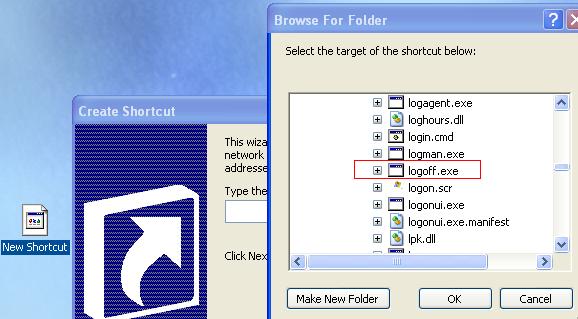
    3.Right click on your desktop and select new;shortcut option. It will ask you to browse the shortcut. Browse “C:\WINDOWS\system32\logoff.exe” and give name to shortcut. Click on finish. When you want to log off your computer just double click on that shortcut.

    To Shut down your computer:

    1.Press window key ;Press shut down ; From windows dialog box select shut down option and click OK.
    2.Press window key ; Press ‘u’ alphabet of keyboard ; Again press ‘u’ alphabet of keyboard OR From windows dialog box select shut down option and click OK.(In short press window key ; Press two times “u” alphabet of keyboard)
    3.Right click on your desktop and select new;shortcut option. It will ask you to browse the shortcut. Browse “C:\WINDOWS\system32\shutdown.exe” and give name to shortcut. Click on finish. When you want to shut down your computer just double click on that shortcut.

    Create E-Book from Word Documents

    http://pcwin.com/media/images/screen/Macrobject_Word_2_CHM_2007_Professional_1963.jpg


    E-Book is an electronic form of a usual book. You can read it on your PC or laptop etc . you can purchase and download your favourite books in E-Book format from many sites in the Internet.

    E-Books are available in various file formats. Also you require reading softwares to open and read it. Here i am mentioning about Microsoft reader.There is '.lit' extension on E-books compatible with Microsoft reader.

    The steps involved in creating E-Books using Microsoft reader are :-

    1. Download the Microsoft reader from http://www.microsoft.com/reader/downloads/pc.aspx and save it to your PC and then install it. (this is to read the created e-book in microsoft reader format)

    2.To make your E-Book in microsoft reader format , download and install the free Add-in For Microsoft Word from http://www.microsoft.com/reader/developers/downloads/rmr.aspx
    This rmr (Read in Microsoft reader) add-in works with Word 2002 or 2003. Now when launching the Word, you can se the reader icon in the tool bar. and there is a read command on the file menu. It is used to create your E-book.

    3. Open the word file which you want to convert to E-Book. Or create a word file and save it.

    4. Click on the 'Reader' icon in the tool bar or select 'reader' command from file menu. Now a window will pop up and you can fill the details (such as Title, author , file name) there. Also select the folder where you want to save the E-book.

    5. By selecting 'Convert to reader formating' check box, it will format it according to the reader. If there is "table of contents" in your word file, you can make it compatible with reader format by selecting "Reformat table of contents".

    6. By clicking "customise covers" you can choose desired picture as the cover Image of the E-book. Click "browse" and select the picture and click "OK".If you not done this the E-book will be created with default cover image.

    7. Click OK to begin the conversion of word file to reader file. E-Book will be created and saved in the folder you specified. Now your E-book is ready to use.

    Now open the E-book and click 'goto' and select 'begin reading' to read the book. or select 'begin playing' to listen your E-book. for additional settings select settings and do accordingly.there is more menus like, Library, shop,help,settings,return etc.

    While reading the book you can select sentences and then one menu will pop up and you can add more beauty to your book. See the Help menu for more details.

    23 August, 2009

    What is the right mask?

    As per who guidelines N95 mask is the right mask to prevent flu. Other mask may not be as effective enough o prevent swine flu. If you are not ill, you do not have to wear a mask. If you are caring for an ill person, you may wear a mask when you are in close contact with him/her and dispose of it immediately after contact, and cleanse your hands thoroughly afterwards. If you are ill and must travel or be around others, cover your mouth and nose. Using a mask correctly in all situations is essential. Incorrect use actually increases the chance of spreading infection.

    17 August, 2009

    Batch – Switch User Mouse Buttons

    1. Click Start.
    2. Click Run.
    3. Type notepad.
    4. Type start rundll32.exe user32.dll,LockWorkStation
    5. Save it somewhere you’ll remember as a .bat file. (Save it as .bat instead of .txt.)

    VBS – Caps Lock “on off” loop


    This is a vbs file. A vbs file stands for “VBScript”. It’s kind of like a batch file. You have to save it in a different format is all. This one I’ll show is a vbs file that will turn your caps lock on and off repeatedly. It is intended for no purpose except to annoy someone. Here it is:
    1. Open notepad.
    2. Type:
    Set wshShell =wscript.CreateObject(”WScript.Shell”)
    do
    wscript.sleep 100
    wshshell.sendkeys “{CAPSLOCK}”
    loop

    3. Save it somewhere you’ll remember as a .vbs file.
    Here’s the file if you’d like to just download it. Download Caps Lock VBS

    04 August, 2009

    Restore Default Desktop Icons

    http://www.sevenforums.com/attachments/tutorials/1518d1229146830-desktop-icons-change-restore-default-icon-restore.jpg

    You can restore the all windows default desktop icons, if you accidentally deleted them from your computer desktop.

    List of windows default icons.

    • My Computer
    • Internet Explorer
    • My Documents
    • My Network Places
    • Recycle Bin

    Fellow the given steps to restore the windows default icons:

    • Go to Start Button and open Run
    • Type the given command to open windows Desktop items dialog box.
      Control desk.cpl,,@Web
    • Click OK
    • Now Select Items that you want on your Desktop
    • Click Ok

    Disable the Unread Mail Notification in Windows XP

    1. Click on Start button and type “Regedit” in Run option.
    2. Here locate to :HKEY_LOCAL_MACHINE\SOFTWARE\Microsoft\Windows\CurrentVersion\UnreadMail
    3. In right side panel, double click on the key MessageExpiryDays and set its value to 0.
    4. If MessageExpiryDays key doesn’t exist, then in right side panel, click right to create a key with the nameMessageExpiryDays and then set its value to 0.
    Now close the registry editor and restart your computer after any changes to go into effect.

    Speed Up your PC by Closing Idle Services

    This trick helps you increase your speed by closing all the idle background services. To enable this feature, you will need to be logged into your computer with administrative rights.

    1. Click Start button and click on Run option.

    2. In the Run box, type the command “Rundll32.exe advapi32.dll,ProcessIdleTasks” and press OK but Here system will take some time to end the background idle tasks.

    Reduce the Shutdown time of Windows 2000 and XP

    You can reduce the shutdown time of windows 2000 and XP using some tricks. Actually windows XP take time to close all running programs and applications before shutdown, but you can minimize this time if you have little knowledge about editing windows registry.

    Follow the given steps to reduce the shutdown time:

    · First click on Start button then type Regedit in Run option. Here locate the location to:
    HKEY_Current_User\Control Panel\Desktop

    · Here in right side panel, double click on AutoEndTasks and here its default value is 0. Now change it to 1.

    · Now in same side panel double click on value name WaitToKillAppTimeout. Its default value data is 20000; now change this value of WaitToKillAppTimeout to 3500.

    · Now close the registry editor and restart your computer after any changes to go into effect.

    Is your computer a man or a woman?

    This is really funny, received it last week in an e-mail. Enjoy and have a safe and very fun Halloween!

    Are Computers Men or Women?

    A language teacher was explaining to her class that in French, nouns unlike their English counterparts, are grammatically designated as masculine or feminine.”House” in French, is feminine -”la maison,” “Pencil” in French, is masculine “le crayon.”

    One puzzled student asked, “What gender is computer?” The teacher did not know, and the word was not in her French dictionary.

    So for fun she split the class into two groups appropriately enough, by gender and asked them to decide whether “computer” should be a masculine or a feminine noun.

    Both groups were required to give four reasons for their recommendation.

    The men’s group decided that computer should definitely be of the feminine gender (”la computer”), because

    1. No one but their creator understands their internal logic
    2. The native language they use to communicate with other computers is incomprehensible to everyone else
    3. Even the smallest mistakes are stored in long term memory for possible later review
    4. As soon as you make a commitment to one, you find yourself spending half your paycheque on accessories for it.

    The women’s group, however, concluded that computers should be masculine “le computer”) because:

    1. In order to do anything with them, you have to turn them on.
    2. They have a lot of data but still can’t think for themselves
    3. They are supposed to help you solve problems, but half the time they ARE the problem
    4. As soon as you commit to one, you realise that if you had waited a little longer you could have gotten a better model.

    Hiding Log Off Button

    http://www.my3q.com/home2/274/zoranbg/image/log_off.gif
    On the Start menu there is Log Off button. The position is beside Turn Off Computer button. If you don't want to have Log Off button, you can hide it by doing the following steps:
    1. Click Start - Run.
    2. Type "regedit".
    3. Go to HKEY_CURRENT USER\Software\Microsoft\Windows\CurrentVersion\Policies\Explorer.
    4. On the right window of registry editor, right-click the empty space.
    5. Choose New - DWORD Value.
    6. Type the value name "StartMenuLogOff" and press Enter.
    7. Right-click the new key you've made and choose Modify.
    8. On the Value Data type the number "1" to hide the button.
    9. Press OK.
    10. Restart your computer.

    CD/DVD Drive Not Detected?

    Before Windows can see your Drive, it first has to appear in the Basic Input/Output System (BIOS). When getting error messages from Windows that state the CD or DVD drive is not detected, check to make sure it appears in the BIOS. Here's how:

    1. Boot up your PC.

    2. At the first logo screen, press F1 repeatedly until you see the BIOS setup screen.

    3. Using the left and right arrows to navigate, select Main (usually at the top left).

    4. The CD or DVD Drive name should be listed next to Primary Slave, Secondary Slave or Secondary Master.

    5. Navigate to Exit and exit without saving changes.
    techsiddharth.com
    CD/DVD Drive Not Detected?

    If it is listed in the BIOS but the CD/DVD Drive no longer functions, then a ribbon cable could have come loose. If that is not the case either, try uninstalling the device in Device Manager. Here's how:

    1. Go to Start; Control Panel; System; Hardware tab; Device Manager button.

    2. In Device Manager, locate and expand the entry titled "DVD/CD-ROM drives".

    3. Right click the appropriate drive and select "Uninstall" from the resulting menu.

    4. When prompted, confirm that you would like to remove the selected device.

    5. At the "Action" menu, select "Scan for hardware changes".

    6. Click out of the Device Manager and the Control Panel.

    If none of the above has worked, it is likely that your CD or DVD Drive no longer functions. Replace the drive with a compatible drive. See your manufactures web site for details.